TIMING / SAVED-FILE EXPERIMENT
Animated GIF to MP4: what happens to unequal frame delays?
A fixed output frame rate can shift the boundaries between pictures in an animated GIF. Our three-frame source held its pictures for 100, 400, and 900 milliseconds. At 30 fps those holds survived this conversion exactly; at 15 and 24 fps some holds changed. Check the saved video’s timing, especially its final hold, rather than assuming that a higher frame rate is always necessary.
Published October 19, 2026 · Original timing experiment
Open the local converter ↗
One source, three real browser exports
We generated an original GIF with three numbered pictures and distinct solid background colors. We set the source delays to 100, 400, and 900 milliseconds, then reopened the GIF with Pillow and read those stored delays back. Their sum is 1400 milliseconds. The source has a 320 by 200 canvas. It is an intentionally simple timing sample, not a representative collection of every kind of GIF.
On October 19, 2026 we selected that local source in the live VideoPromptFlow tool in Chrome. We left output size at 100 percent and converted separately at 15, 24, and 30 fps. We pressed Download MP4 for each result. Although the automation did not receive its expected download notification, the browser saved separate files in the local Downloads folder. We copied those actual files into the experiment record and decoded them; this test is not based only on a Done badge.
The browser reported a duration of 1.4 seconds for 15 fps, 1.416667 seconds for 24 fps, and 1.4 seconds for 30 fps. Each preview had a decoded width of 320 and readyState four. The saved files contained 4843, 4888, 5208 bytes respectively, measured from the downloaded files. File size is not our timing measurement.
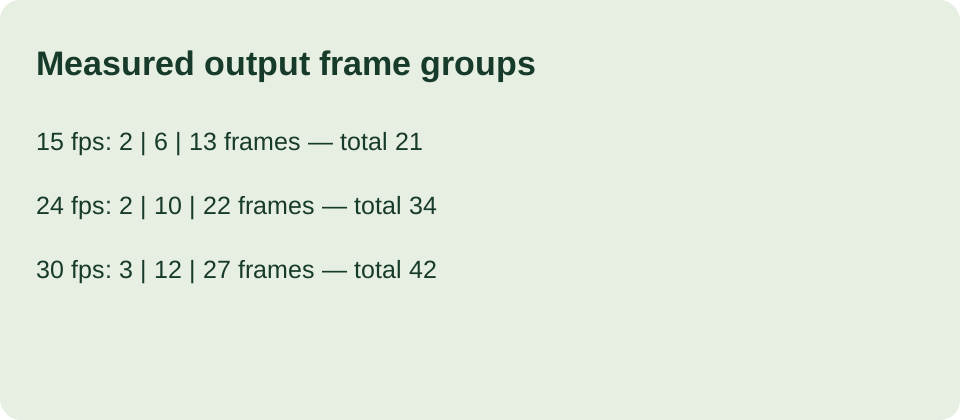
For the saved 15 fps video we decoded 21 frames. The first source picture occupied two output frames, the second occupied six, and the third occupied thirteen. Dividing those counts by 15 gives holds of approximately 0.133333, 0.4, and 0.866667 seconds. The total stayed at 1.4 seconds even though the first and last holds changed. Matching total duration alone would therefore miss a timing difference.
At 24 fps the saved video decoded to 34 frames, grouped as two, ten, and twenty-two frames of the three source pictures. Dividing by 24 gives approximately 0.083333, 0.416667, and 0.916667 seconds. The total is 34 divided by 24, or approximately 1.416667 seconds. At 30 fps the groups were three, twelve, and twenty-seven frames: 0.1, 0.4, and 0.9 seconds. These are measured output runs, not estimates inferred from the input.
How we identified the picture boundaries
We decoded the downloaded MP4 files with local FFmpeg and retained its showinfo timestamp log. For every decoded RGB frame, we compared the top-left pixel with the three known background colors and assigned the nearest source color. We then grouped consecutive frames with the same label. The numbered pictures provide an additional visual reference. This classifier relies on our deliberately distinct solid colors; it is not a general scene detector.
Our hold calculation is consecutive output frames divided by selected output fps. The timestamp logs independently locate each transition. In the 15 fps file the second picture begins at approximately 0.133333 seconds and the third at 0.533333. At 24 fps those starts are approximately 0.083333 and 0.5 seconds. At 30 fps they are 0.1 and 0.5 seconds. Rounding in the displayed decimals does not change the underlying frame counts.
We also read the current conversion code. It applies an fps filter after scaling, encodes H.264 video, and asks the GIF decoder to ignore source looping. The resulting video has a fixed cadence even though source pictures have unequal holds. The code observation explains what operation to inspect; it does not replace the downloaded-file measurements above. We did not measure every palette, disposal mode, very short delay, or browser implementation.
Choose a setting for the actual motion
Inspect picture changes and the final hold in the player where the video will be used. For this particular source, 30 fps matched the three intended holds. That finding is not a universal best-setting claim: different source delays can fall between a different set of output ticks. Repeating pictures in a fixed-rate stream also does not create new motion detail.
Keep the original GIF and compare one complete cycle before deciding whether a small boundary change matters for your use. A quick total-duration check is useful, but our 15 fps result shows why it is insufficient by itself. Check the transition positions as well. This experiment establishes no conversion-speed or file-size recommendation.
Timing questions from the sample
Does a matching total duration prove matching frame delays? No. Our 15 fps file had the same total duration as the source while redistributing the first and last holds.
Does 30 fps always preserve an animated GIF exactly? No. It matched the delay pattern in this sample. Other source delays and decoding behavior need their own measurement.
Should the saved MP4 repeat forever? The conversion writes one source cycle. A player may repeat that video separately; playback repetition and the encoded timeline are different controls.
Repeat the check with our files
These are our original generated sample and actual browser exports, supplied for inspection.

Related checks
Compare preview looping with the saved video cycle, or use our conversion recovery checklist if the result will not play.
For GIF output, compare three compression levels on the same downloadable GIF and check size separately from frame timing.
To compare container output directly, try the GIF to WebM and MOV converter with actual frame timestamps.
When the destination asks for pixel dimensions, resize a GIF while checking the saved dimensions and frame delays.
Changing order is a separate operation from measuring a delay: reverse GIF frames and their own delays together.